The email you’re putting off. The idea you don’t want to lose. The paragraph that needs a little work. Say it. Gabsy helps you make it something worth sending.
Mac private alpha · Apple silicon · macOS 26+ iOS coming soon. No payment required.
A THOUGHT, READY TO GO
▂ ▆ ▃ █ ▂ ▅ YOU SAY
“Tell Alex the first draft is ready. I’d love their thoughts by Friday. Keep it friendly.”
A little more you.↗
To Alex
Hi Alex,
The first draft is ready! I’d love to hear what you think when you have a chance.
Could you send your feedback by Friday?
⌂ Your words. Your Mac.
Illustrative writing example. Your meaning stays in charge.
01 Think out loud.
02 Find the right words.
03 Keep your momentum.
FROM “LET ME THINK” TO “SEND”
You don’t have to say it perfectly.
Ramble a little. Change your mind. Gabsy helps your meaning come through.
YOUR THOUGHT, OUT LOUD
“Hi Alex, um, the first draft is ready. Can you have a look and send me your feedback by Friday? Oh, and keep it friendly.”
✳
A natural thought becomes a friendly email. The request and the Friday deadline stay intact.
WITH GABSYREADY TO SEND
Hi Alex,
The first draft is ready! Could you take a look and send me your feedback by Friday?
Thanks so much!
Your request. Your deadline. A warmer way to say it.
Prepared examples show the intended workflow. This website does not record audio or run the Mac app. Review AI-generated wording before sending.
THERE’S MORE IN YOUR VOICE
A better way to get your day into words.
For the things you write all day. And the thoughts you haven’t written yet.
01 / SAY IT
Get the thought down. Keep the good bits.
Speak naturally, including the “ums” and second thoughts. Adjustable cleanup helps turn it into clear sentences, with punctuation and formatting already considered.
Dictation + local cleanup02 / MAKE IT YOURS
Sound like yourself. On a good writing day.
Your names. Your terminology. Your favourite sign-off. Vocabulary, snippets and writing transforms help bring your own style into the words you use every day.
Vocabulary + personal style03 / SAY IT BETTER
One more thought? Just say the change.
Make a selection shorter. Warm up a paragraph. Change the date without rewriting the whole document. Voice editing helps you work on the words already there.
Voice editing in supported editors
“Let’s do Tuesday. Actually, Wednesday.”
ONE THOUGHT. ROOM TO CHANGE IT.
TALK LIKE A PERSON
Change your mind. Keep your meaning.
Real thoughts don’t arrive in perfect sentences. Say “actually”, correct a date, or go back to something you said earlier. Gabsy’s cleanup helps resolve the correction into the words you meant.
Less stopping to start again. More room to think out loud.
Choose Message, Email or Notes formatting. Shift between natural, formal, casual or excited tones. Set preferences for different kinds of apps, with app-specific overrides.
02 Give your favourite words a head start. +
Save names, technical terms and exact phrase replacements. Turn a spoken trigger into your full multiline signature, a regular reply or a reusable prompt. Import and export snippets as JSON or CSV.
03 Turn a rough draft into what you need. +
Polish it. Make it concise. Turn it into bullets. Shape a better AI prompt. Translate it to English. Create your own transforms and add writing samples to guide the style.
04 Work on the paragraph you mean. +
Use a separate editing shortcut for selected text or a named paragraph: first, last, current, previous and more. Rewrite or delete the target while leaving untouched paragraphs out of generation. Supported editors need Accessibility permission.
05 Review it. Retry it. Undo it. +
See the original transcript and word-level changes. Retry cleanup from your original words. Use undo/redo in Scratchpad and guarded external undo where supported. Newer edits are protected from late model responses.
06 Keep it close. Keep control. +
Recognition and cleanup can stay on your Mac. Saved history is off by default, with a 24-hour limit when enabled. Optional nearby-text and window context help with the task at hand, with controls for what Gabsy can read.
07 Fit around the way you work. +
Hold to talk, toggle, or double-tap for hands-free. See the floating recording panel, level meter and timer; Escape cancels. Pick your microphone, import short audio files, and use menu-bar controls without keeping a large window open.
08 The useful little things are here, too. +
Copy or paste your last result. Set separate dictation and editing shortcuts. Choose launch at login. See local usage statistics. Review a spoken Perplexity or Google search before it opens, including selected text only when you choose.
ROOM FOR YOUR NEXT GREAT THOUGHT
Some ideas need a little space.
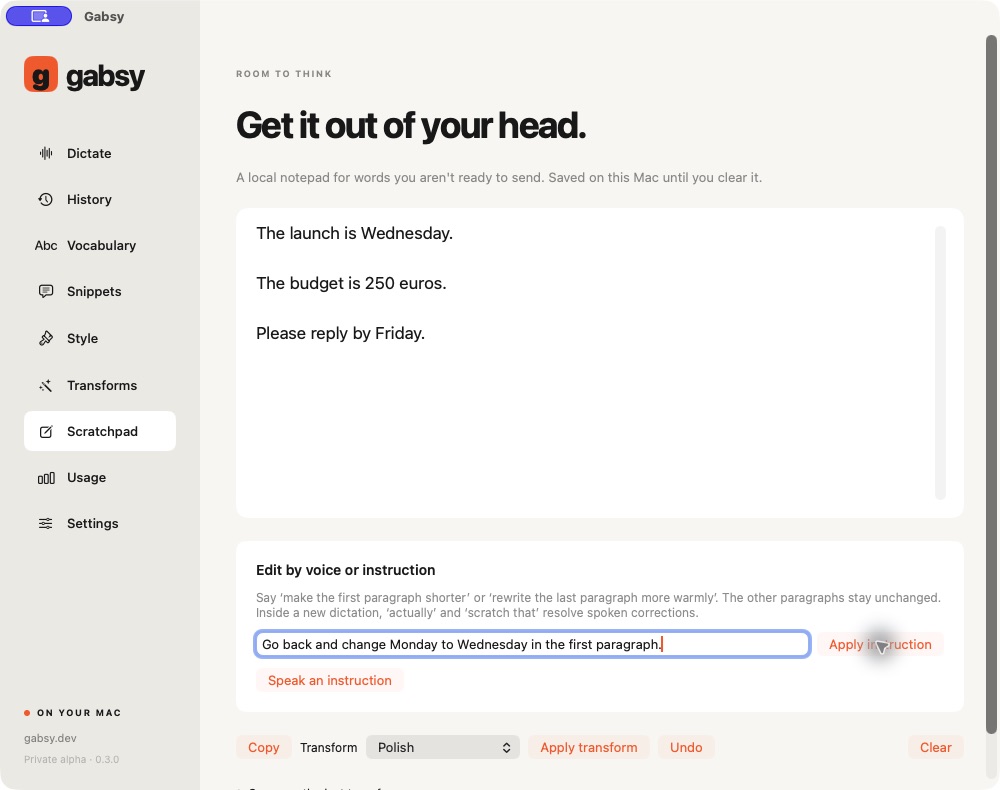
Meet Scratchpad. A quiet place to dictate, reshape and polish a thought before it goes anywhere.
Compare the original with the result. Try another transform. Undo a change. You’re always the editor.
Inside the private alpha: current features and what’s next +
The Mac alpha implements local recognition and cleanup, formatting, vocabulary, snippets, transforms, Scratchpad and voice editing. Real TextEdit paragraph replacement and safe undo have been checked; compatibility across other editors, physical keyboard timing, audio routes, notarisation and distribution are still being tested.
The newer installed private alpha adds longer recording support, pause/resume, Apple live text preview, project libraries, conversational edits and optional BYOK text cleanup. These are being refined and checked before release. iOS is coming soon, with an internal phone alpha being tested. Meeting capture, automatic account sync, broad language validation and public release readiness are not established. No public download is available yet.
THE PRIVATE ALPHA IS GROWING
More room to think. More ways to make it yours.
Built into the newer private alpha. Being refined and checked before release.
↗
Stay with the thought.
Longer recordings, pause and resume, plus live text preview with the Apple recognition option. Longer live sessions and audio-route recovery are still being tested.
⌘
A shortcut that feels yours.
Flexible two-physical-key bindings for dictation and editing are being tested. Protected system combinations and normal typing still need to stay out of each other’s way.
“ ”
Talk through the change.
“Keep the first sentence.” “Change every Friday to Monday.” Conversational edits and guarded undo are being refined in supported text fields.
✳
Different projects. Your words.
Project vocabulary, snippets and portable libraries bring the right terminology along. Manual library transfer is supported; automatic sync and team administration are later work.
Mac first. iOS coming soon. An internal iPhone companion and keyboard alpha is being tested. Public availability follows acceptance testing.
PRIVATE ALPHA / NO PUBLIC RELEASE DATE YET
05 / FIND YOUR FIT
Your workflow. Your choice.
Gabsy is being built for people who want local writing tools and a simple starting price.
Desktop dictation comparison · checked 22 October 2026
What matters to you
Gabsy Private alpha
Wispr Flow
Superwhisper
Processing
Local recognition + cleanup. Optional BYOK cleanup in development.
Internet required for transcription.
Local and cloud options. Offline AI formatting has model/mode requirements.
Free desktop plan
2,000 words each week, permanently free at launch.
Free plan available; current limits and eligibility on its site.
Unlimited local Whisper dictation; up to 2 modes without AI processing.
Individual paid plans USD, website list prices
$7.99/month or $79.99/year Planned launch pricing
$15/month or $12/month billed annually.
$8.49/month, $84.99/year or $249.99 lifetime.
Beyond dictation
Scratchpad, snippets, transforms and voice editing in the Mac alpha.
Shared team tools and Notetaker options.
Custom modes, file transcription and Meetings on Mac.
USD launch pricing. Applicable taxes may be added. Plans are not on sale yet. No bundled unlimited cloud AI is included. Feature availability and billing will be confirmed before public release; iOS pricing is not announced.
A little more before you go.
Can I download it yet?+
Gabsy is in private Mac alpha. Join the waitlist for availability news. We are not taking payments or offering a public download yet. The demo above uses prepared examples and never activates your microphone.
What does my Mac need?+
The current alpha targets Apple silicon and macOS 26 or later. Local models require several gigabytes of storage and an initial internet download. Microphone permission is needed to record; Accessibility is needed for insertion and editing in other apps. Final requirements will be confirmed at release.
Will it work on my iPhone?+
iOS is coming soon. An internal phone alpha is being tested. Public availability and the final keyboard workflow have not been announced.
Can I bring my own AI key?+
Optional text-only cloud cleanup for compatible HTTPS chat-completion endpoints is in development. Compatibility depends on the provider, model and response format, so we do not promise that every API key works. Local use needs no key; provider usage would be billed separately to you.
What happens to my waitlist email?+
We store it for Gabsy availability updates, without advertising trackers. You can remove it using the private link shown after signup. No purchase or account is created. Read our privacy notice.
FOR EVERYTHING YOU HAVE TO SAY.
Your next good idea deserves a voice.
Get Gabsy launch news in your inbox. Start with 2,000 free desktop words a week when we launch.